LGA vs PGA is a key comparison when you choose a CPU, motherboard, embedded processor, or custom electronics platform. LGA places pins in the socket. PGA places pins on the CPU package. This small structural difference affects durability, power delivery, repairability, PCB layout, and long-term product support.
At Fast PCB Layout Manufacturer, we explain LGA and PGA in a clear engineering way. You will learn how each socket works, why Intel and AMD use different designs, and how these package choices affect PCB design, PCBA manufacturing, sourcing, and reliability.
LGA vs PGA at a Glance
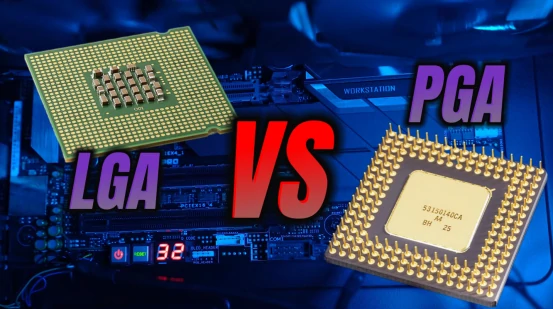
The main difference between LGA and PGA is pin location. An LGA processor uses flat contact pads on the CPU, while the motherboard socket contains spring contacts. A PGA processor uses metal pins on the CPU, while the motherboard socket contains matching holes or contacts.
| Feature | LGA | PGA |
|---|---|---|
| Full Name | Land Grid Array | Pin Grid Array |
| Pin Location | Motherboard socket | CPU package |
| CPU Bottom | Flat contact pads | Metal pins |
| Pin Density | Higher | Lower |
| Repair Risk | Socket damage is harder to repair | CPU pins can sometimes be straightened |
| Common Platforms | Intel LGA1700, LGA1851, AMD AM5 | AMD AM4 and older CPUs |
LGA is becoming more common in modern CPU platforms because it supports more contacts in less space. PGA remains useful in older, simpler, and repair-friendly systems.
What Is LGA?
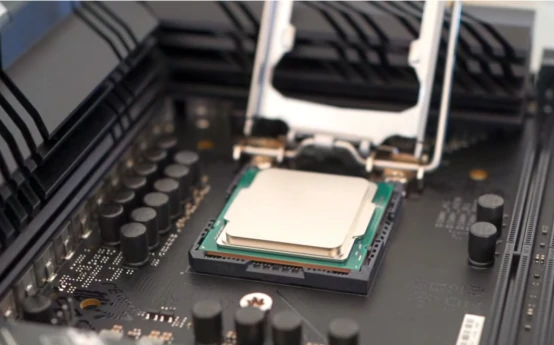
LGA stands for Land Grid Array. An LGA processor uses flat metal lands on the bottom of the package. These lands touch spring contacts inside the motherboard socket. This design moves the fragile pins away from the CPU package and into the socket.
Modern Intel desktop processors use LGA sockets. Common examples include LGA775, LGA1151, LGA1200, LGA1700, and LGA1851. AMD also moved to LGA with AM5. This shift shows a clear industry trend toward denser and more scalable CPU connections.
The main advantage of LGA is scalability. It supports more power pins, ground pins, memory signals, PCIe lanes, and high-speed interfaces. This makes LGA better for modern processors that require stronger current delivery and faster data movement.
The main disadvantage is socket fragility. LGA socket contacts are delicate. Bent contacts can prevent booting, memory detection, or PCIe communication. Repair is usually harder than PGA pin repair because the damaged contacts sit inside the motherboard socket.
What Is PGA?
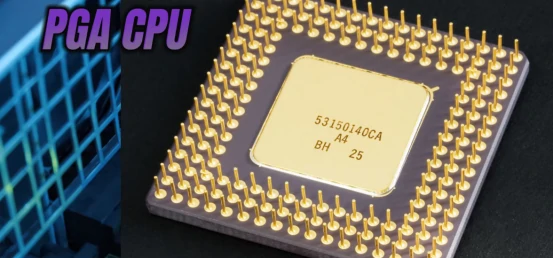
PGA stands for Pin Grid Array. A PGA CPU has physical pins on the bottom of the processor. These pins insert into the motherboard socket. AMD AM4 is one of the best-known PGA platforms.
Many PGA sockets use a ZIF mechanism. ZIF means Zero Insertion Force. The user places the CPU into the socket and locks it with a lever. This makes installation simple when the pins are straight and aligned.
The main advantage of PGA is easy visual inspection. Bent CPU pins are visible. Skilled technicians can sometimes straighten minor pin damage with precision tools. The socket structure is also simpler than a dense LGA socket.
The main disadvantage is limited scalability. Modern processors need more contacts, faster interfaces, and stronger power delivery. Thin CPU pins can also bend during handling, shipping, installation, or cooler removal.
LGA vs PGA: Detailed Comparison
The best way to compare LGA vs PGA is to look beyond socket shape. Engineers should compare mechanical design, electrical density, power delivery, signal integrity, repair cost, and lifecycle risk.
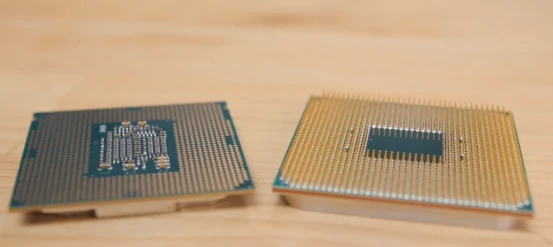
| Factor | LGA | PGA |
|---|---|---|
| Mechanical Strength | Stronger CPU package, delicate socket | Delicate CPU pins, simpler socket |
| Electrical Density | Higher | Lower |
| Power Delivery | Better for high-current CPUs | Good for lower or mid-range platforms |
| Signal Integrity | Better for dense high-speed systems | Less ideal for very dense platforms |
| Repairability | Harder socket repair | Possible CPU pin repair |
| Future Scalability | Higher | Lower |
LGA is generally stronger for newer high-performance platforms. PGA is generally better when direct inspection and CPU-side repair matter more. Neither design is always better. The application decides the answer.
Why Intel Uses LGA and AMD Moved to LGA
Intel uses LGA because modern processors need more contacts, better current handling, and stronger platform scalability. Intel LGA sockets also make sense for workstation and server processors that require high memory bandwidth and large I/O capacity.
AMD used PGA for many years because AM4 matched its platform strategy. AM4 served gamers, workstation users, and mainstream PC builders for several generations. It became one of the most successful PGA CPU platforms.
AMD later moved to LGA with AM5. This change supported DDR5, PCIe 5.0, higher power delivery, and future processor growth. The AM4 to AM5 transition shows why modern CPUs increasingly favor denser connection systems.
LGA vs PGA for PCB Design and PCBA Manufacturing
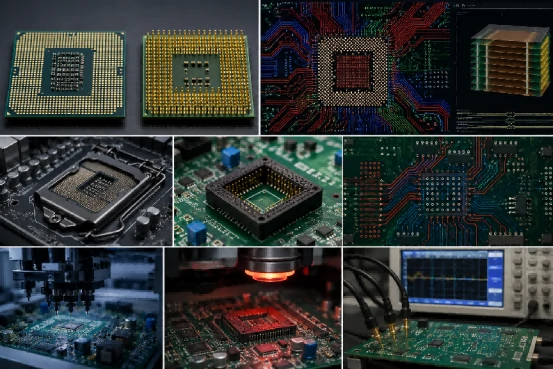
LGA vs PGA is not only a PC-building topic. It also affects PCB footprint design, routing density, stack-up planning, socket sourcing, assembly inspection, and production reliability.
LGA platforms usually require more advanced PCB design because modern processors use higher pin counts and faster interfaces. Engineers must manage pad geometry, keep-out zones, via fanout, impedance control, DDR routing, PCIe routing, power planes, and return paths.
PGA systems can be easier to route in older or simpler platforms. However, modern embedded systems may still require strict layout rules, even when the processor package looks less complex.
During PCBA manufacturing, socket placement accuracy is critical. Contact surfaces must stay clean. Functional testing must verify memory, power, and I/O stability. Poor contact pressure can create intermittent failures that are difficult to diagnose.
At Fast PCB Layout, engineers can review CPU socket decisions from both the PCB layout side and the PCBA manufacturing side. For dense processor-heavy boards, professional PCB assembly services can help verify orientation, inspection, and production validation.
Common LGA and PGA Failure Modes
Most CPU socket failures are mechanical rather than electrical. Understanding failure modes helps engineers reduce field problems and improve product reliability.
Bent LGA Socket Contacts
LGA platforms are vulnerable to bent socket contacts. Even one damaged contact can affect memory initialization, PCIe communication, power stability, or system boot.
Bent PGA CPU Pins
PGA processors place pins on the CPU package. These pins can bend during installation, shipping, handling, or cooler removal. Minor damage may be repairable. Severe damage often requires CPU replacement.
Uneven Contact Pressure
Improper mounting pressure can create unstable electrical connections. This risk increases when hundreds or thousands of contacts must stay aligned across the CPU package.
Contamination and Oxidation
Dust, oil, oxidation, or foreign particles can increase contact resistance. Engineers should keep socket areas clean during assembly, repair, and maintenance.
Thermal Stress
Repeated thermal cycling can create mechanical stress between the CPU, socket, and PCB. Industrial and embedded systems in harsh environments need stronger thermal planning.
LGA vs PGA vs BGA
LGA and PGA are socketed package types. BGA is different. BGA stands for Ball Grid Array. A BGA package uses solder balls under the chip. The chip is usually soldered directly to the PCB.
| Package Type | Connection Method | Best Use | Serviceability |
|---|---|---|---|
| LGA | Flat pads contact socket pins | Desktops, servers, workstations | Replaceable CPU, delicate socket |
| PGA | CPU pins enter socket holes | Legacy desktops, AM4 systems | Replaceable CPU, repairable pins |
| BGA | Solder balls attach to PCB | Laptops, embedded systems, compact devices | Harder to rework |
BGA offers high density and strong electrical performance. It is common in embedded systems, laptops, IoT devices, and compact industrial electronics. However, BGA is harder to service because the chip is not easily removable.
Design Checklist Before Choosing a CPU Socket
Before selecting a processor platform, engineers should evaluate more than raw CPU speed. A good socket choice balances performance, manufacturability, repairability, supply stability, and product lifecycle.
| Question | Why It Matters |
|---|---|
| How many PCIe lanes are required? | Affects pin count and routing complexity |
| Are DDR5 or PCIe 5.0 required? | Usually favors LGA platforms |
| Is field repair important? | PGA may be easier to inspect and repair |
| What is the expected product lifespan? | Long-lifecycle products need stable platforms |
| How complex is the PCB design? | Higher pin counts need advanced routing |
| Is future CPU upgrade needed? | Impacts platform and socket selection |
The best solution is not always the newest socket. It is the socket that best matches the product’s electrical, mechanical, and commercial requirements.
How to Choose Between LGA and PGA
Choose LGA when your product needs higher performance, more I/O, better power delivery, faster interfaces, and stronger future scalability. LGA is usually better for modern CPUs, workstation platforms, AI systems, telecom equipment, and high-speed industrial electronics.
Choose PGA when your platform is simpler, older, easier to inspect, or tied to a specific PGA ecosystem. PGA can still work well for repair-friendly systems, education boards, legacy AMD platforms, and lower-complexity applications.
| Use Case | Better Choice | Reason |
|---|---|---|
| Modern desktop PC | LGA | Higher scalability |
| Legacy AMD AM4 system | PGA | Platform compatibility |
| Server or workstation | LGA | More pins and stronger power delivery |
| Compact embedded device | BGA or LGA | Higher density and smaller footprint |
| Repair-friendly education system | PGA | Easier visual inspection |
| High-speed custom PCB | LGA | Better for dense routing and fast interfaces |
For procurement teams, the best choice is not only the cheapest option. Teams should compare lifecycle, motherboard availability, replacement cost, socket durability, and supplier roadmap before final selection.
Conclusion
LGA and PGA solve the same basic problem in different ways. They connect a processor to a motherboard. LGA places pins in the socket and pads on the CPU. PGA places pins on the CPU and holes in the socket.
LGA is denser, more scalable, and better suited for modern high-performance systems. PGA is simpler, easier to inspect, and still useful in legacy or repair-friendly platforms. BGA is stronger for compact embedded products but harder to rework.
For engineers, PCB designers, and sourcing teams, the best choice depends on performance goals, PCB complexity, manufacturing process, repair strategy, and product lifecycle.
Instant quotes for PCBA solutions:
https://wellerpcb.com/electronics-manufacturing-services-contact-information/
FAQs
Is LGA better than PGA?
LGA is better for modern high-performance processors because it supports higher contact density, stronger power delivery, and better scalability. PGA is better when visual inspection and CPU-side repairability matter more.
What is the biggest difference between LGA and PGA?
The biggest difference is pin location. LGA places pins in the motherboard socket. PGA places pins on the CPU package.
Can bent LGA or PGA pins be repaired?
PGA CPU pins can sometimes be straightened with precision tools. LGA socket contacts are harder to repair because they sit inside the motherboard socket.
Which socket type is easier for first-time builders?
PGA is often easier to inspect because the pins are visible. However, LGA can protect the CPU package better because the processor bottom has flat pads instead of pins.
Which socket type is best for industrial and embedded systems?
LGA is often better for high-speed industrial systems that need strong power delivery and long-term scalability. BGA is common in compact embedded products. PGA can work for simpler or legacy systems.